
On this page
- Quick answer: the best Clockify alternatives
- What Clockify is in 2027
- Why agencies look for Clockify alternatives
- First decide what you are replacing Clockify for
- How to choose a Clockify alternative for a marketing agency
- Clockify alternatives compared
- The 7 best Clockify alternatives in 2027
- 1. Verbial
- 2. Harvest
- 3. Toggl Track
- 4. Everhour
- 5. Timely
- 6. TimeCamp
- 7. My Hours
- How the options score for agencies
- A worked example: the Clockify report vs the margin view
- When Clockify is still the right choice
- How to switch from Clockify without losing a billing cycle
- The bottom line
- Common questions
Clockify is a cheap, capable timer, but it does not list retainer billing, puts margin reports on its Pro plan and charges a seat for every invited user. Decide whether you need a different timer (Toggl Track, Everhour, Timely), a timer with billing (Harvest, TimeCamp, My Hours) or a system that ties hours, retainers, invoices and client margin together (Verbial), then switch over one billing cycle.
Clockify is where a lot of marketing agencies start tracking time, because the free plan covers unlimited users and the paid plans are some of the cheapest per seat on the market. The search for Clockify alternatives usually starts once the agency is selling monthly retainers, hourly overages and one-off projects to the same clients. By then leadership is asking "are we making money on this account", and Clockify was built to answer "who logged what".
This guide is for owners and operations leads at marketing agencies with roughly 10 to 200 people. It compares seven alternatives on invoicing, retainers, client margin and switching. Vendor details come from each company's own website as of November 2026, so check them again before you buy.
Quick answer: the best Clockify alternatives
- Verbial: best for marketing agencies that want time tracking, retainers, invoicing and client margin in one system, built around how agencies bill.
- Harvest: best for teams that want a familiar timer with invoicing and accounting integrations built in.
- Toggl Track: best for teams that want a polished timer with planning, and are happy to invoice elsewhere.
- Everhour: best for teams that want timers inside Asana, ClickUp, Jira or monday.com, with budgets and invoicing.
- Timely: best for teams that would rather capture time automatically than start and stop timers.
- TimeCamp: best for teams that want a Clockify-style price with automatic tracking and invoicing on the entry plan.
- My Hours: best for small teams that want a simple project timer with budgets and approvals.
What Clockify is in 2027
Clockify describes itself as a time tracker and timesheet app, and its homepage says it is trusted by more than 7 million users. The product goes wide: timers, timesheets, a clock-in kiosk, GPS, activity monitoring, scheduling, time off, expenses, invoicing and payroll reports. The industries featured in its site menu are lawyers, consultants, startups, construction, developers and accountants. Agencies are not among them, and the feature set reflects that.
Its pricing page lists five tiers:
- Free: unlimited users and unlimited tracking, but reports only cover a one month data range.
- Basic: listed at $3.99 per seat a month billed annually, or $4.99 monthly. It adds billable rates and the kiosk.
- Standard: listed at $5.49 billed annually, or $6.99 monthly. It adds invoicing from tracked time, recurring invoices, timesheet approvals, locked timesheets and a QuickBooks integration.
- Pro: listed at $7.99 billed annually, or $9.99 monthly. It adds scheduling, forecasting, expenses, budgets and estimates, and labor cost and profit reports.
- Enterprise: listed at $11.99 billed annually, or $14.99 monthly. It adds single sign-on and an audit log.
The pricing page also notes that every active or invited user listed on your team page occupies one paid seat, including the owner, admins, managers and members.
Why agencies look for Clockify alternatives
The timer is rarely the problem. Agencies move on because of what happens after the hour is logged.
- Retainers are not hours. A monthly retainer is sold as a fixed fee, often split across departments. Clockify can hold a time or money budget on a project, but retainer billing is not among its listed features, so it cannot tell you that a client's retainer is running hot with ten days left in the month. That is the idea behind retainer burn rate.
- Margin depends on rates someone typed in. Labor cost and profit reports sit on the Pro plan, and they work from the hourly cost and billable rates you enter. Over-servicing a retainer client then looks like extra revenue rather than lost margin, which is the servicing gap most agencies only find at renewal.
- Freelancers take full seats. Every active or invited person on the team page occupies a paid seat, so a bench of freelance writers and designers costs the same per head as leadership.
- You pay for workforce features you will not use. Kiosk clock-ins, GPS tracking and activity monitoring suit shift and field teams more than client service teams. An agency needs its billing models handled, not its staff located.
- The commercial side lives elsewhere. Clockify does not list a CRM pipeline or proposals, so the deal that set the scope, the hours that delivered it and the invoice that billed it sit in three tools. Ad spend and other pass-through costs are handled by hand.
First decide what you are replacing Clockify for
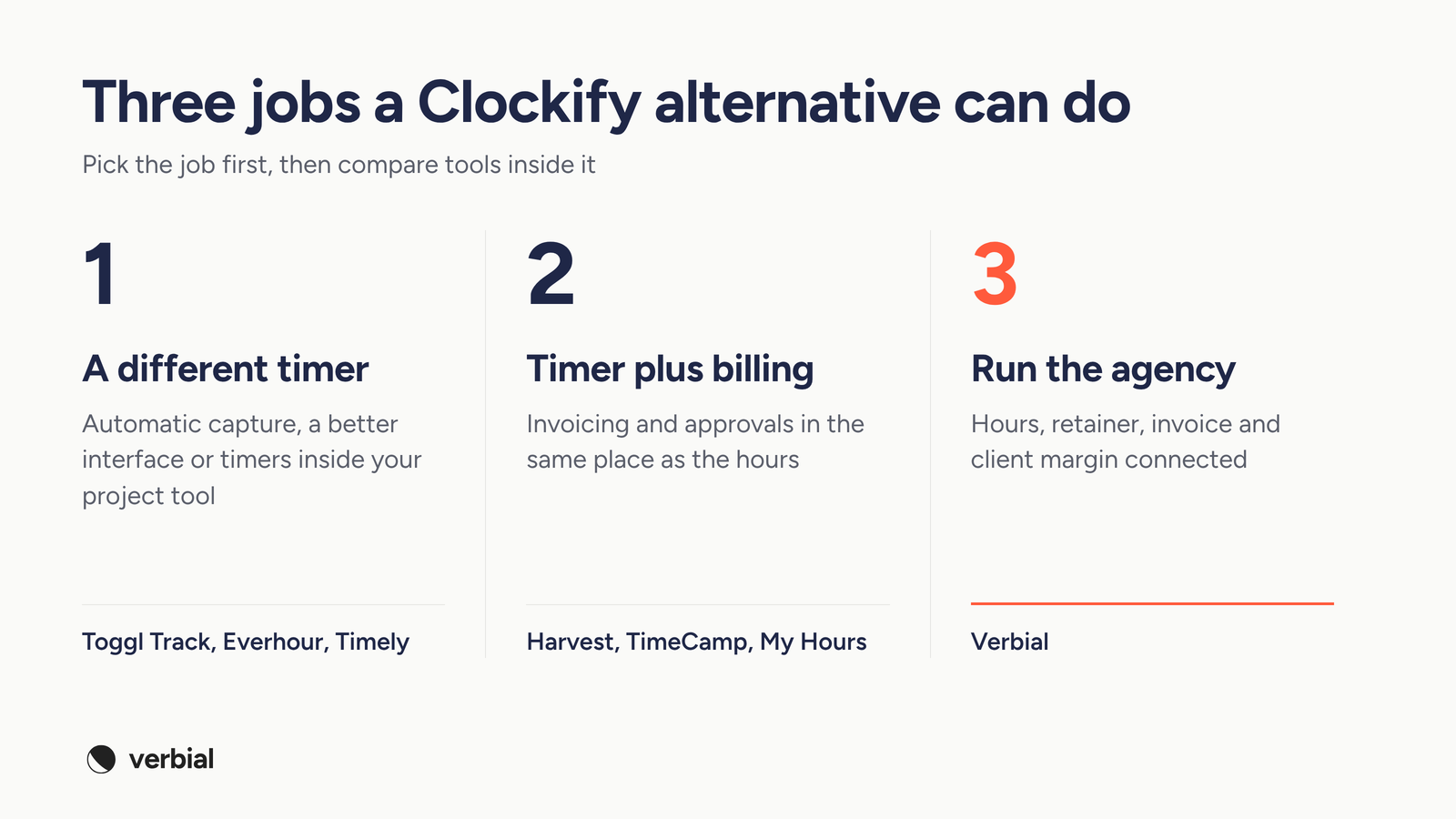
Most "Clockify alternatives" lists mix different kinds of product, so pick the job first.
- A different timer. You like Clockify's scope but want automatic capture, a better interface or timers inside your project tool. Look at Toggl Track, Everhour and Timely.
- Timer plus billing. You want invoicing and approvals in the same place as the hours, without moving the rest of the agency. Look at Harvest, TimeCamp and My Hours.
- Run the agency. You want the deal, the hours, the retainer, the invoice and the margin for each client connected, so nobody rebuilds the month in a spreadsheet. Look at Verbial.
A quick test: if leadership's last five questions about a client were "who logged what", you need a different timer. If they were "are we over the retainer and are we making money on this account", you need the third category.
How to choose a Clockify alternative for a marketing agency
Score each option on the places where agency work differs from generic time tracking.
- From hours to invoice. Do approved hours become invoice lines directly, or do you export a report and rebuild it?
- Billing models. Can one client have a monthly retainer, hourly overages, a one-off project and pass-through ad spend, and can you change the terms mid-engagement?
- Retainer pacing. Can you see burn against what the client pays this month while the month is still running?
- Real margin. Does the tool use what each person actually costs, or a rate you type in? Does it keep media spend out of agency revenue?
- Who needs a full seat. Check how each vendor charges for people who only ever log time, and whether there is a minimum number of seats.
- Migration. Can you bring your Clockify history across, preview it and undo it if it is wrong? Our migration checklist lists what to export first.
Clockify alternatives compared
The table summarises what each vendor lists on its own site. Prices are the lowest paid plan per user a month, billed annually, unless noted.
| Tool | Price as listed | Invoicing | Client margin | Retainers |
|---|---|---|---|---|
| Clockify | Free plan; Basic $3.99/seat/mo | Standard plan and up | Labor cost and profit on Pro | Not listed |
| Verbial | See the pricing page | Approved hours become invoice lines | By client, project, department and person | Allocation by department, early overrun warning |
| Harvest | Free for 1 seat; Teams $9/seat/mo | Built in, plus Stripe, QuickBooks and Xero | Profitability reports on Enterprise | Project budgets |
| Toggl Track | Free plan; Starter $9/user/mo | Export billable hours as CSV or PDF | Profitability reports on Premium | Fixed fee projects on Premium |
| Everhour | Free up to 5 seats; Team $8.50/seat/mo, 5-seat minimum | Included on Team | Budgets with alerts | Not listed |
| Timely | Starter $9/user/mo, up to 5 users | Bill from logged time | Budgets and costs on Premium | Not listed |
| TimeCamp | Free plan; Starter $3.99/user/mo | Included on Starter | Budgets on Premium, billing rates on Ultimate | Not listed |
| My Hours | Free up to 5 users; Basic $4/user/mo | Invoice billable time | Labor costs and profit and loss | Monthly budgets |
The 7 best Clockify alternatives in 2027
1. Verbial
Verbial is comprehensive agency management software built for marketing agencies. It connects the CRM pipeline, proposals, time tracking, invoicing, client reporting and profitability, so every client shows its real margin while the month is still running.
The difference from Clockify is where an hour goes after it is logged. In Verbial, people log time with a timer or a quick entry, tagged to the right client and department, and timesheets are approved weekly with reminders. Each hour is measured against the client's monthly allocation by department, and the account manager gets an early warning when a client is running hot, while there is still time to act. With invoicing, approved hours become invoice lines for hourly clients and usage statements for retainers, and overages are quoted and paid before the extra work starts. The profitability view measures each client against what it pays and what your team actually costs, reports idle capacity on its own line and keeps media pass-through out of revenue.
- Best for: marketing agencies that want to replace Clockify and the spreadsheets around it, rather than swap one timer for another.
- Who sees what: members see hours only, while account managers, directors and admins see rates, revenue and margin.
- Switching: the Clockify import brings clients, projects, tasks and time entries across by connecting your account or uploading Clockify's detailed export. Durations come across exactly as logged, people are matched by email, and you see a preview before anything changes and can undo the whole import.
- Plans: contributor seats cover people who only track time against assigned work, and clients view shared items free with no login. See the Verbial pricing page for current plans and what each includes.
2. Harvest
Harvest pairs a simple timer with invoicing and expense tracking. The Teams plan is listed at $9 per seat a month billed annually, or $11 monthly, and integrates with Stripe, QuickBooks Online and Xero. Profitability reporting by client, project, task or team and timesheet approvals sit on the Enterprise plan, listed at $14 per seat billed annually. A free plan covers 1 seat and 2 projects.
- Best for: teams that want a simple timer with more finished invoicing and payments.
- Watch out for: Harvest says that as your team grows, additional invoices, projects, clients and tasks are billed based on what you use. Our Harvest alternatives guide covers where agencies outgrow it.
3. Toggl Track
Toggl Track is a polished timer that is widening into capacity management and project planning. Starter is listed at $9 per user a month billed annually, or $12 monthly, and adds billable rates and team revenue reports. Premium, at $16 billed annually, adds labor costs and profitability reports, fixed fee projects and timesheet approvals.
- Best for: teams that want a clean timer and planning, and invoice from their accounting tool.
- Watch out for: Toggl's invoicing page describes using tracked billable hours as the basis for invoices and exporting them as CSV or PDF, so the invoice is still built somewhere else. See our Toggl alternatives guide.
4. Everhour
Everhour puts timers inside the tools your team already uses, including Asana, ClickUp, Jira, Linear, monday.com, Basecamp and Notion. Its Team plan is listed at $8.50 per seat a month billed yearly, with every feature included: integrations, budgets with alerts, invoicing and expenses. A limited free plan covers up to 5 seats.
- Best for: agencies whose delivery team lives in a project management tool and does not want another app.
- Watch out for: the Team plan has a minimum of 5 seats, and margin depends on how well your project tool's structure matches the way each client is billed.
5. Timely
Timely tracks time automatically from the apps and websites people use and fills in timesheets for them, so nobody starts or stops a timer. Starter is listed at $9 per user a month billed yearly, capped at 5 users and 20 projects. Premium, at $16, raises the cap to 50 users and adds budgets and costs, and Unlimited, at $22, removes the user cap and adds capacity management.
- Best for: teams where the real problem is that people forget to log time at all.
- Watch out for: automatic capture still needs someone to review and assign the hours, and the user caps mean a growing agency moves up a tier quickly.
6. TimeCamp
TimeCamp is the closest match to Clockify on price. Starter is listed at $3.99 per user a month billed annually, or $5.49 monthly, and includes invoicing, attendance and time off. Premium, at $6.99, adds billable time, budgets and estimates, and app and website tracking. Ultimate, at $9.99, adds timesheet approvals, billing rates and expenses. A free plan covers unlimited users.
- Best for: teams that want automatic tracking and invoicing without paying much more than Clockify.
- Watch out for: its AI time tracker is billed separately by usage, and approvals and billing rates only arrive on the top self-serve plan.
7. My Hours
My Hours is a straightforward project timer. Basic is listed at $4 per user a month billed annually, and Pro, at $8, adds rates and budgets, granular permissions and an approval workflow with an audit log. It also lists monthly budgets, email budget alerts, labor costs and invoicing. The free plan is limited to 5 active users.
- Best for: small teams that want budgets and approvals on top of a simple timer.
- Watch out for: like most timers, budgets sit on projects and tasks rather than on each client's monthly fee, and there is no CRM or proposal side.
How the options score for agencies
The matrix scores each option on the four things agencies usually weigh against Clockify. A full mark means it is part of the product, a half mark means it is partial, an export or only on a higher tier, and an empty mark means you will need another tool.
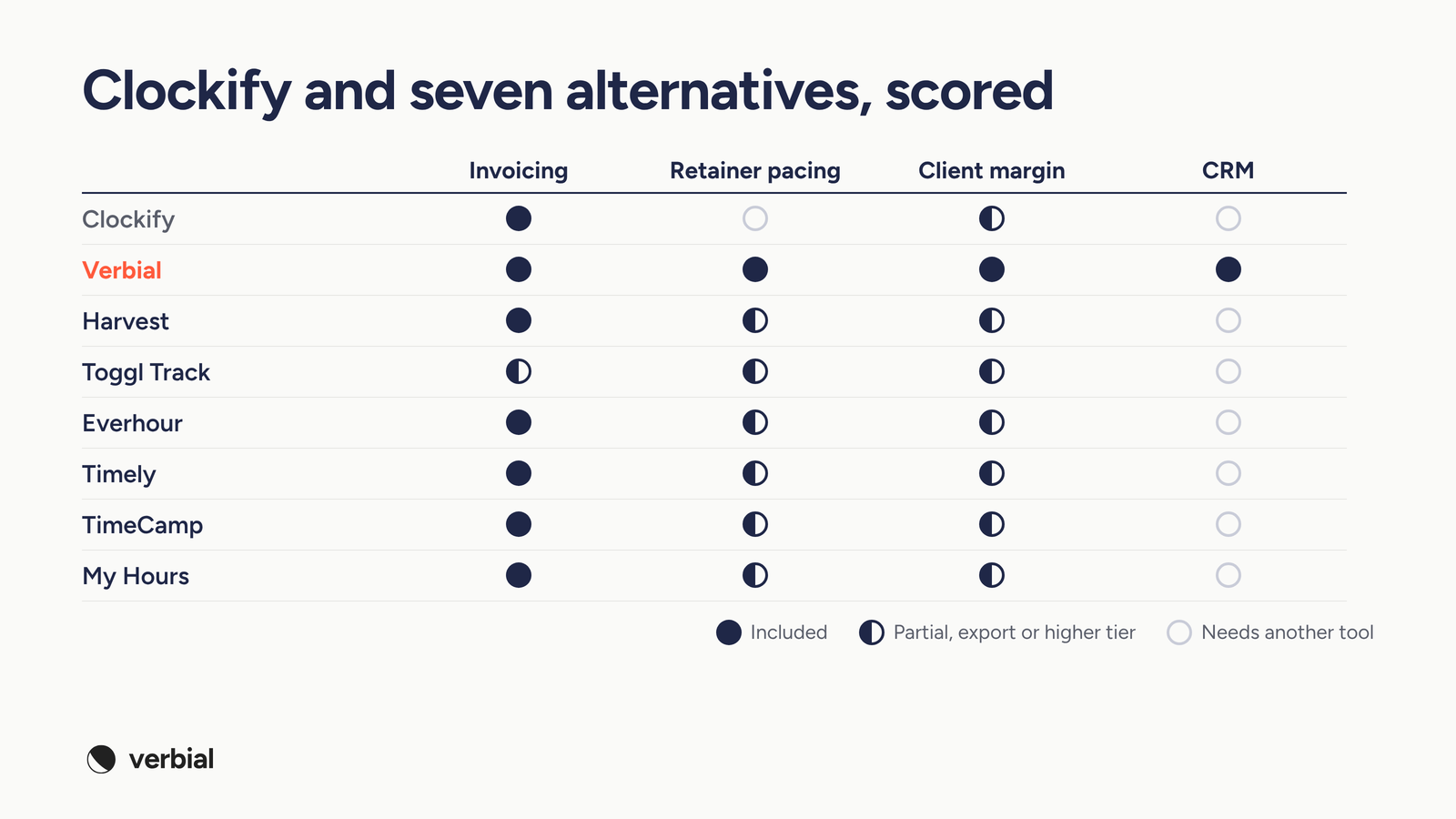
The timers close some of Clockify's gaps, mostly invoicing and budgets, but leave retainers, real margin and the pipeline where they were. Verbial measures every hour against the client's allocation rather than a project estimate, and it is the only option here with a CRM and proposals in the same system as the hours.
A worked example: the Clockify report vs the margin view
Take a hypothetical agency client on a $12,000 monthly retainer for paid social and content, budgeted at 90 hours, with $8,000 of ad spend re-billed each month. By the 20th, the team has logged 84 hours, 20 of them by a freelance designer.
Clockify's Pro reports would show 84 hours logged, who logged them, how many were billable and a profit figure built from the rates you entered. A margin view shows the retainer at 93% of its hours with ten days to go, which department is over its share, the cost of those hours at what the people actually earn, and the margin on the $12,000 fee alone, with the $8,000 of ad spend kept out of revenue. One view says the team was busy. The other says call the client about scope this week.
That is why our guide to time tracking for retainer pacing argues for pacing the retainer rather than policing the team.
When Clockify is still the right choice
Clockify is a good product, and there are cases where it is the better fit.
- You are under 10 people, bill mostly hourly and are happy to build invoices in your accounting tool.
- You need a free timer for a large team and margin reporting is not the job.
Otherwise, the export step, the seat for every freelancer and the monthly spreadsheet usually cost more than the timer saves. Our post on time tracking that agency teams actually do covers the habits that make any tool stick.
How to switch from Clockify without losing a billing cycle
Run the switch alongside one billing cycle, starting just after an invoice run.
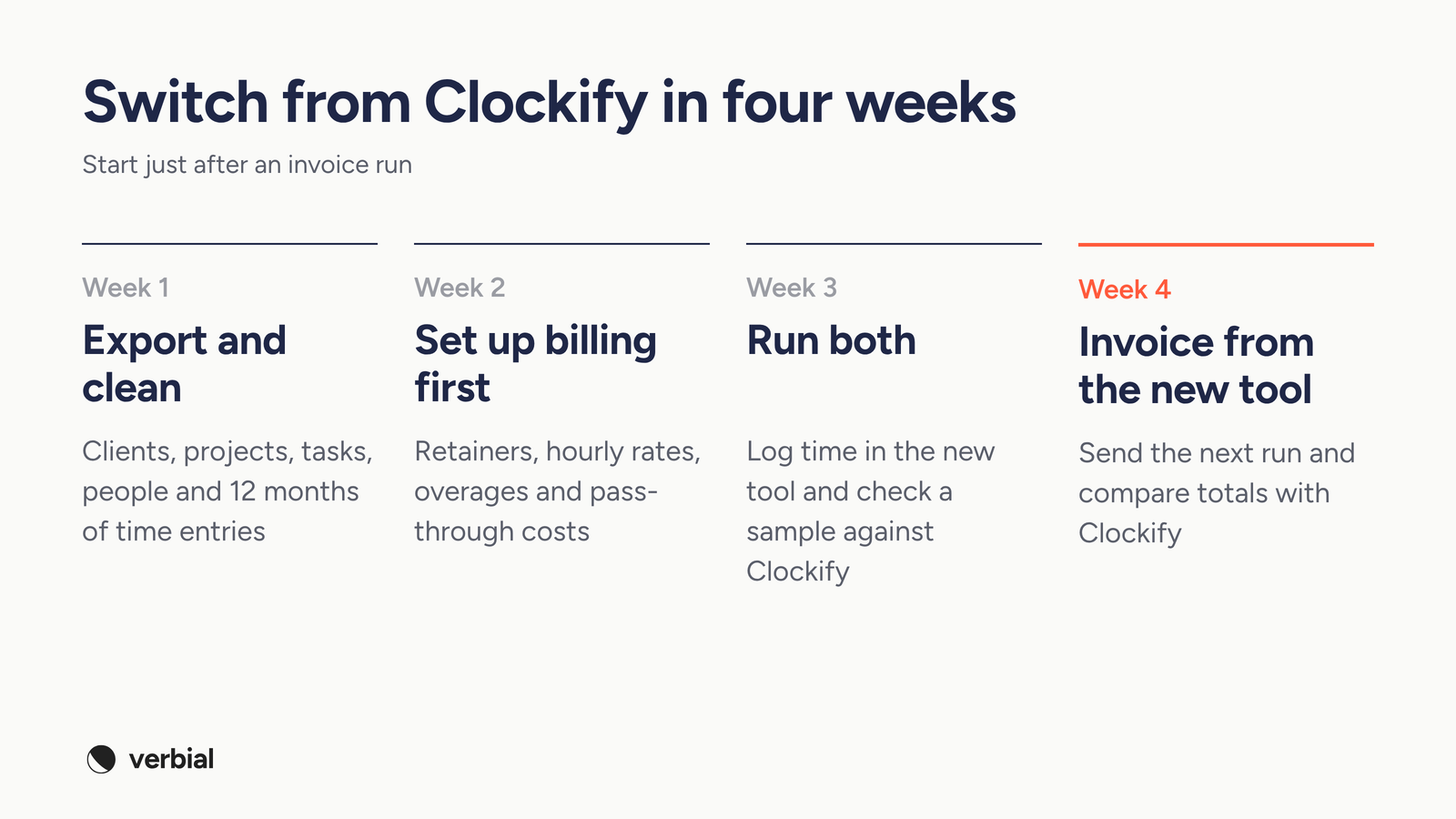
- Week 1: export and clean. Export clients, projects, tasks, people and at least 12 months of time entries from Clockify's detailed report. Archive dead projects first.
- Week 2: set up billing first. Recreate each client's billing model, including retainers, hourly rates, overages and pass-through costs, before anyone logs time.
- Week 3: run both. Have the team log time in the new tool while finance checks a sample of entries against Clockify.
- Week 4: invoice from the new tool. Send the next invoice run from the new system and compare totals with what Clockify would have billed.
The bottom line
The best Clockify alternative depends on why you are leaving. For a different timer, Toggl Track, Everhour and Timely are all solid. For invoicing and approvals next to the hours, compare Harvest, TimeCamp and My Hours. If the real problem is that the hours, the retainer, the invoice and the margin for each client live in different places, look at agency management software such as Verbial, which connects them so you can see each client's margin while the month is still running.
Common questions
What is the best Clockify alternative for a marketing agency?
It depends on why you are leaving Clockify. For a different or more automatic timer, compare Toggl Track, Everhour and Timely. For invoicing and approvals next to the hours, look at Harvest, TimeCamp or My Hours. If you want each client's hours, retainer, invoice and margin connected in one system, look at agency management software such as Verbial, which is built around how marketing agencies bill.
Is Clockify good for marketing agencies?
Clockify is a solid, low-cost timer, and its free plan covers unlimited users. It starts to strain when an agency sells retainers, because retainer billing is not among its listed features, margin reports sit on the Pro plan and use rates you enter, and every active or invited user takes a paid seat, including freelancers.
Is there a free alternative to Clockify?
Yes. TimeCamp has a free plan for unlimited users, Everhour's free plan covers up to 5 seats with limited features, My Hours is free for up to 5 active users and Harvest's free plan covers 1 seat and 2 projects. Free plans suit freelancers and very small teams, but agencies usually need paid features such as approvals, invoicing and profitability reports.
How much does Clockify cost?
Clockify lists a Free plan, then Basic at $3.99 per seat a month billed annually ($4.99 monthly), Standard at $5.49 ($6.99), Pro at $7.99 ($9.99) and Enterprise at $11.99 ($14.99). Every active or invited user on the team page occupies a paid seat. Check clockify.me/pricing for current figures.
Does Clockify do invoicing?
Yes. Invoicing from tracked time and expenses, recurring invoices and timesheet approvals are on the Standard plan and above, and invoices can be downloaded as PDF. What Clockify does not list is retainer billing, so fixed-fee clients, pre-paid overages and usage statements still need a workaround.
Can I move my time data from Clockify to another tool?
Yes. Export clients, projects, tasks, people and time entries from Clockify's detailed report before you switch. Verbial's Clockify import brings clients, projects, tasks and time entries across by connecting your account or uploading that export, keeps durations exactly as logged, matches people by email, and lets you preview the import and undo it.
What is the difference between Clockify and agency management software?
Clockify is built around the timesheet: it records how long work took across many industries and reports on it. Agency management software such as Verbial starts from what each client pays. It measures every hour against the client's monthly allocation, turns approved hours into invoice lines and shows each client's margin against what your team actually costs, alongside the CRM and proposals that sold the work.
Written by Alex Borden. Filed under Operations, Profitability.