
On this page
- Quick answer: the best Harvest alternatives
- Why agencies look for Harvest alternatives
- First decide which job you are replacing Harvest for
- How to choose a Harvest alternative for a marketing agency
- The 8 best Harvest alternatives in 2027
- 1. Verbial
- 2. Productive
- 3. Scoro
- 4. Teamwork.com
- 5. Accelo
- 6. Toggl Track
- 7. Clockify
- 8. Everhour
- How the options compare
- A worked example: what Harvest shows and what you need
- When to stay on Harvest
- How to switch from Harvest without losing a billing cycle
- The bottom line
- Common questions
Harvest is a good timer, but agencies outgrow it when they need retainer billing, client margin and the pipeline in one place. Decide first whether you need a better timer (Toggl Track, Clockify, Everhour), time plus delivery (Productive, Teamwork.com, Scoro) or a system to run the agency (Verbial, Accelo, Scoro), then switch over one billing cycle.
Harvest is one of the easiest ways to get a team logging hours and sending invoices, which is why so many marketing agencies start on it. The trouble usually shows up a few years later. The agency now sells retainers, hourly overages and pass-through ad spend to the same client, the owner wants margin by client rather than hours by project, and the pipeline, proposals and reports live in three other tools that never talk to Harvest.
This guide is for owners and operations leads at marketing agencies with roughly 10 to 200 people who are weighing Harvest alternatives in 2027. It explains why agencies outgrow Harvest, how to decide which job you are actually replacing it for, and how eight alternatives compare on the things agencies care about: billing models, retainer pacing, cost and margin, approvals and how hard the switch will be. Prices are as listed on each vendor's pricing page in October 2026, so check them again before you buy.
Quick answer: the best Harvest alternatives
- Verbial: best for marketing agencies that want time, invoicing, retainers, proposals and client margin in one system.
- Productive: best for agencies that want project delivery, budgets and resource planning in one tool.
- Scoro: best for larger service firms that want to assemble a professional services platform app by app.
- Teamwork.com: best for client-service teams that live in project plans and want time budgets and retainers on top.
- Accelo: best for professional services firms that want a quoted, guided rollout of a full platform.
- Toggl Track: best for teams that want a cleaner timer with profitability reports, and nothing more.
- Clockify: best for agencies that need the lowest cost per seat for time tracking and simple invoicing.
- Everhour: best for teams that want timers inside their project management tool, with budgets and invoicing.
Why agencies look for Harvest alternatives
Harvest does its core job well. Its pricing page lists one-click timers, weekly and daily timesheets, expense tracking, invoicing for time and materials and fixed fee projects, and more than 50 integrations, including QuickBooks, Xero and Stripe. The reasons agencies leave are less about the timer and more about everything around it.
- Usage-based pricing on top of seats. Harvest's Teams plan is listed at $11 per seat a month, or $9 billed annually, and its Enterprise plan at $17.50, or $14 billed annually. The same page now says that as your team grows, additional invoices, projects, clients and tasks are billed based on what you use. For an agency with many small retainers, that makes the monthly bill harder to predict.
- Profitability and approvals sit on the higher tier. Profitability reporting by client, project, task or team, timesheet approvals and the activity log are listed as Enterprise features, not Teams features.
- Scheduling is a separate product. Resource planning lives in Harvest Forecast, which connects to Harvest rather than being part of it.
- The agency's commercial side is elsewhere. Harvest has no CRM pipeline, no proposals and no client reporting, so the deal, the scope, the hours and the invoice sit in different systems. That is the gap we covered in our guide to replacing HubSpot, Harvest and PandaDoc.
- Hours are not margin. Harvest can show hours against a budget. It does not know that the retainer was sold at a fixed fee, that ad spend on the same invoice is a pass-through cost, or what each person costs fully loaded. Agencies end up rebuilding client profitability in a spreadsheet every month.
First decide which job you are replacing Harvest for
Most "Harvest alternatives" lists mix three very different kinds of product. Before you compare features, decide which job you need done, because the right shortlist changes completely.
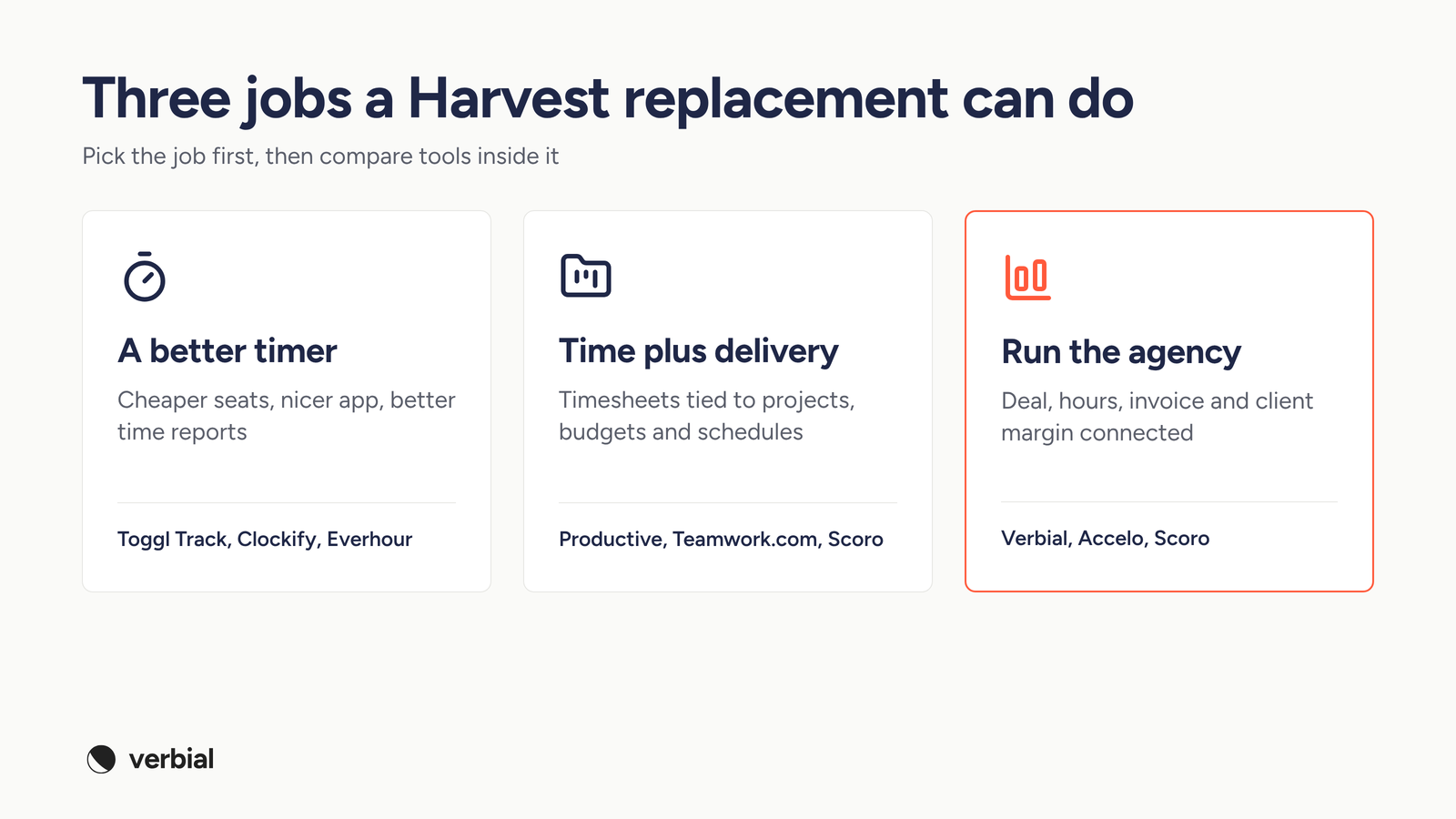
- A better timer. You like Harvest's scope and want cheaper seats, a nicer app or better reports. Look at Toggl Track, Clockify and Everhour. Expect to keep your CRM, proposal tool and spreadsheet margin model.
- Time plus delivery. You want timesheets tied to projects, tasks, budgets and schedules, so the delivery team plans and logs in one place. Look at Productive, Teamwork.com and Scoro.
- Run the agency. You want the deal, the proposal, the hours, the invoice and the margin for each client connected, so nobody rebuilds the month in a spreadsheet. Look at Verbial, and at Accelo or Scoro if you are a larger, more complex professional services firm.
A quick test: list the last five questions your leadership team asked about a client. If they were mostly "who logged what", you need a better timer. If they were "are we over the retainer, did that invoice go out and are we making money on this client", you need the third category.
How to choose a Harvest alternative for a marketing agency
Use these criteria to score each option. They are the places where agency work differs from generic professional services.
- Billing models. Can one client have a monthly retainer, hourly overages, a one-off project and pass-through ad spend, ideally on one invoice? Can you change the terms mid-engagement without starting over?
- Retainer pacing. Can you see retainer burn against the month while it is still running, not after the invoice goes out?
- Cost rates. Can you store a cost per person as well as a bill rate, so the tool reports margin and not just revenue?
- Approvals. Can managers approve time weekly before it is billed, and on which plan?
- Who needs a full seat. Many agencies have designers, writers and specialists who only ever log time. Check how each vendor prices those people, and whether freelancers pay full price.
- Minimums. Several tools on this list have minimum seat counts. That matters if you want to pilot with a small team.
- Migration. Can you import clients, projects, time and invoices from Harvest, and check the import before it goes live? Our migration checklist covers what to export first.
The 8 best Harvest alternatives in 2027
1. Verbial
Verbial is comprehensive agency management software built for marketing agencies. It connects the CRM pipeline, proposals, time tracking, invoicing, client reporting and profitability, so each client shows its real margin while the month is still running.
For a team leaving Harvest, the parts that matter most are these. Time is logged with a timer or a quick entry, tagged to the right client and department, and approved weekly. Invoicing handles the way agencies actually bill: a retainer, hourly work and pass-through ad spend can sit on one invoice, and you can change the billing model without starting over. The profitability view shows contracted revenue, fully loaded cost, gross margin and the servicing gap for each client, so you can see which retainers are over-serviced before the month closes.
- Best for: marketing agencies that want to replace Harvest and the tools around it, rather than swap one timer for another.
- Switching: the migration hub imports companies, contacts, deals, clients, projects, time and invoices from Harvest, Toggl, HubSpot, Asana and CSV exports, and you can preview an import and undo it if it is wrong.
- Pricing: priced per full seat, with lower-cost contributor seats for people who only track time against assigned work. Clients can view shared items free. See the Verbial pricing page for current plans. The 14-day free trial needs no credit card.
- Watch out for: resource planning and forecasting are not part of the core plans, so check the plan comparison if scheduling is a must-have.
2. Productive
Productive is an agency operations platform that combines projects, budgeting, resource planning, time tracking and reporting. Its Professional plan, listed at $29 per user a month billed yearly, adds recurring budgets, billable time approvals and invoicing integrations. Project scenarios, overhead calculation and the HubSpot integration sit on the Ultimate plan, which is now "Let's talk" on the pricing page.
- Best for: agencies whose main pain is delivery planning and budgets across many projects.
- Watch out for: every plan requires at least 3 seats, and freelancers and contractors are charged the same price as employees. Clients are free. We compare it in depth in Productive vs Verbial.
3. Scoro
Scoro is a professional services automation platform made of eight core apps: Do, Deliver, Track, Resource, Sell, Estimate, Spend and Invoice. You combine the apps you need, and the data links up between them. Combinations start from €15 per user a month, there is a 14-day free trial, and the Deliver app includes retainer management.
- Best for: larger agencies and multi-service firms that want quoting, delivery, resourcing and billing in one platform and have someone to own the setup.
- Watch out for: the minimum is 5 users, and extras are paid add-ons on top of any combination, so price the full setup you need, not the starting combination.
4. Teamwork.com
Teamwork.com is project management built for client-service teams. Basics, at $9.99 per user a month billed annually, adds billable time tracking and reporting. Accelerate, at $24.99, adds time budgets and retainers, workload and capacity planning, and client invoicing from logged time. Revenue, cost and profitability insights sit on Optimize, which is priced through sales.
- Best for: teams that plan everything in projects and tasks and want time tracking to live inside that plan.
- Watch out for: Basics needs at least 3 users and Accelerate at least 5. CRM-to-project handoff and profitability are on the sales-priced tier.
5. Accelo
Accelo is a professional services automation platform covering pipeline, projects, resource planning and revenue forecasting. Pricing is a custom quote based on team size and goals, and plans include implementation guidance and onboarding support. Accelo says most teams are up and running in a matter of weeks.
- Best for: established firms that want a guided rollout and are comfortable with a sales-led buying process.
- Watch out for: there is no public price, so you cannot compare costs until you talk to sales. If Accelo is already on your shortlist, our Accelo alternatives post covers the trade-offs.
6. Toggl Track
Toggl Track is a time tracker with a free plan and paid Starter and Premium tiers. Premium adds labor costs and profitability reports, fixed fee projects, project dashboards for time against estimates, timesheet approvals and Jira and Asana integrations. Capacity planning is sold as a paid add-on.
- Best for: agencies that want a better timer and better reports, and are happy to keep CRM, proposals and invoicing elsewhere.
- Watch out for: Toggl Track is a time and planning tool, not a billing system, so retainer invoicing still needs another tool. Toggl describes itself as taking an anti-surveillance stance, which helps with team adoption.
7. Clockify
Clockify is the low-cost option. Its free plan covers unlimited time tracking for small teams. The Standard plan, at $5.49 per seat a month billed annually or $6.99 monthly, adds invoicing, recurring invoices, approvals and time locking. The next tier, at $7.99 billed annually, adds labor cost and profit, budgets and estimates, scheduling and expenses.
- Best for: agencies that mainly want to cut the cost of time tracking and simple invoicing.
- Watch out for: every active or invited user takes a paid seat, and Clockify does not offer refunds, so trial the paid features first. Like Toggl, it leaves CRM and proposals to other tools.
8. Everhour
Everhour is a time tracker that sells one Team plan with every feature included, at $8.50 per seat a month billed yearly. That plan includes native integrations with tools such as Asana, ClickUp, Jira and Trello, plus billing, budgeting and invoicing. There is a free plan for up to 5 seats with limited features.
- Best for: teams that run delivery in a separate project management tool and want time, budgets and invoices tied to it.
- Watch out for: the paid plan has a minimum of 5 seats, and the free plan is limited to basic time tracking, projects, reports and export.
How the options compare
The matrix below scores each option on four things agencies usually leave Harvest for. A full mark means it is part of the product, a half mark means it is partial, an add-on or only on a sales-priced tier, and an empty mark means you will need another tool.
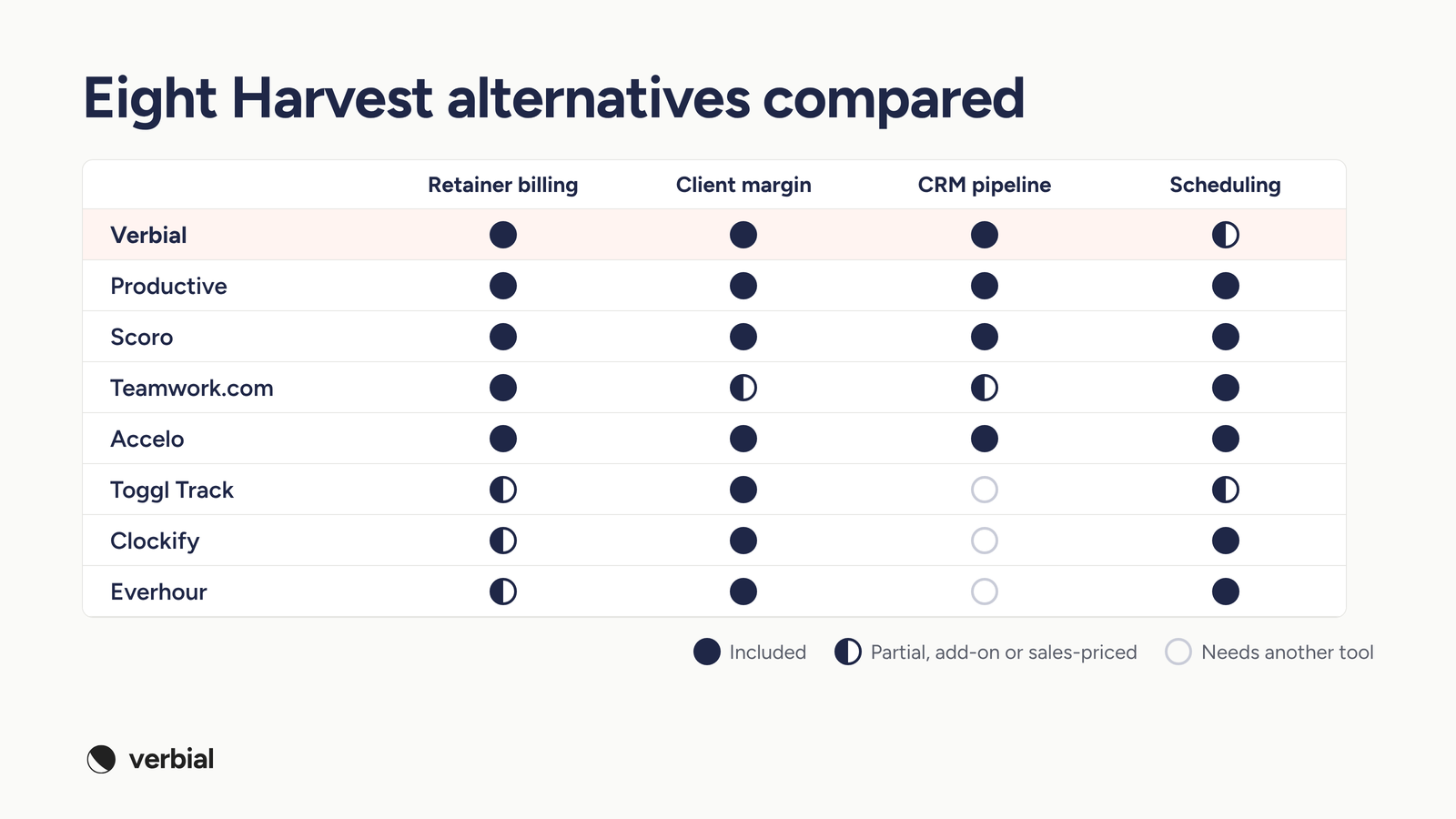
Two patterns stand out. The timers (Toggl Track, Clockify and Everhour) are strong on time and cost reporting, but leave the pipeline and most retainer billing to other tools. The platforms (Productive, Scoro, Teamwork.com and Accelo) cover delivery and scheduling well, but come with seat minimums, paid extras or sales-led pricing. If retainers and client margin are the reason you are leaving Harvest, check those two columns first, then decide how much delivery planning you need in the same tool.
A worked example: what Harvest shows and what you need
Take a hypothetical client on an $8,000 monthly SEO retainer, budgeted at 64 hours. By the 20th of the month, the team has logged 58 hours, and the client also has $5,000 of ad spend to re-bill.
In Harvest, you can see 58 of 64 hours used, which looks fine. What you cannot see in the same place is that two senior strategists logged most of those hours, so the fully loaded cost is already close to the fee, or that the ad spend is a pass-through that should not count as agency revenue. A tool built for agencies should show the retainer as roughly 91 percent used with a third of the month left, the expected overrun in hours and cost, and the margin on the agency fee alone. That is the difference between knowing the hours and knowing whether the client is profitable.
When to stay on Harvest
Harvest is still a good choice in some cases, and switching has a real cost.
- You are under about 10 people, mostly bill hourly or fixed fee, and your margin model in a spreadsheet takes less than an hour a month.
- You are happy with your CRM and proposal tools, and the only problem is the timer, which Harvest already does well.
- You rely on a specific Harvest integration that your shortlist does not support.
If none of those apply, the cost of staying usually shows up as unbilled hours, retainers that run over without anyone noticing and a monthly profitability report that is already out of date.
How to switch from Harvest without losing a billing cycle
The safest switch runs alongside one billing cycle. Pick a start date just after an invoice run, so the first invoices from the new tool are a full month later.
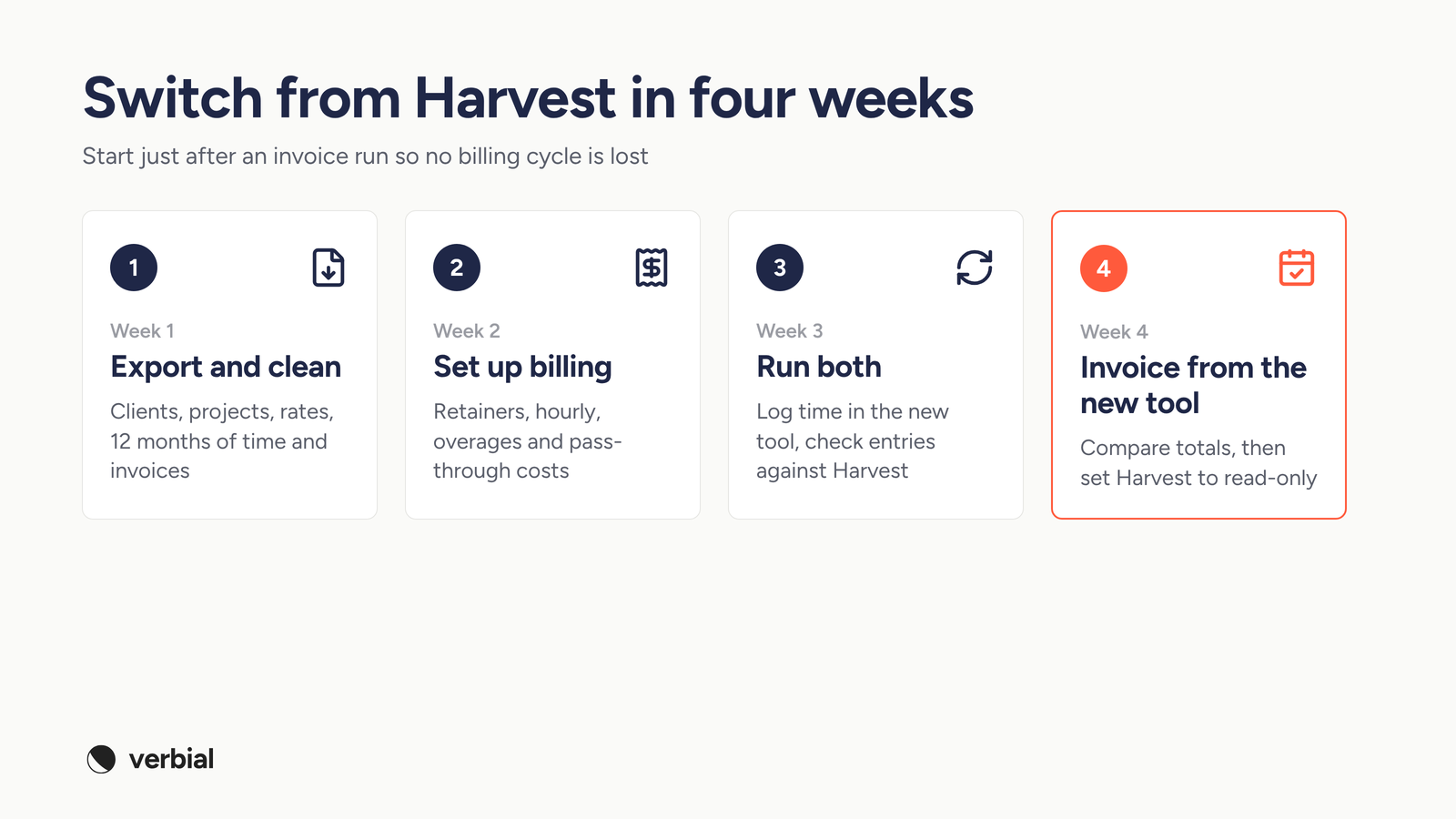
- Week 1: export and clean. Export clients, projects, tasks, people with their bill and cost rates, and at least 12 months of time entries and invoices from Harvest. Archive dead projects before you import them.
- Week 2: set up billing first. Recreate each client's billing model, including retainers, hourly rates, overages and pass-through costs, before anyone logs time in the new tool.
- Week 3: run both. Have the team log time in the new tool while finance checks a sample of entries against Harvest. Fix rates and project mapping now, not on invoice day.
- Week 4: invoice from the new tool. Send the next invoice run from the new system, compare the totals with what Harvest would have billed, then set Harvest to read-only and keep the export.
The bottom line
The best Harvest alternative depends on the job. If you only need a cheaper or nicer timer, Clockify, Toggl Track and Everhour are all sensible choices. If delivery planning is the gap, look at Productive, Teamwork.com and Scoro. If the real problem is that the deal, the hours, the invoice and the margin for each client live in different tools, look at agency management software such as Verbial, which connects them so you can see each client's margin while the month is still running.
Common questions
What is the best Harvest alternative for a marketing agency?
It depends on why you are leaving. If you only want a cheaper or simpler timer, Clockify, Toggl Track and Everhour are strong choices. If you want time tied to projects and schedules, look at Productive, Teamwork.com or Scoro. If you want the deal, the hours, the invoice and the margin for each client in one place, look at agency management software such as Verbial.
Is there a free alternative to Harvest?
Yes. Clockify has a free plan for small teams, Toggl Track has a free plan, and Everhour is free for up to 5 seats with limited features. Free plans usually leave out invoicing, cost rates and profitability reports, which are the features agencies most often need.
Does Harvest include resource planning?
Not in the core product. Harvest's scheduling and resource planning tool is Harvest Forecast, a separate product that connects to Harvest. If you want scheduling in the same tool as time and invoicing, compare Productive, Scoro, Teamwork.com, Clockify and Everhour.
Can I move my Harvest data to another tool?
Yes. Export clients, projects, people with their rates, time entries and invoices from Harvest before you switch. Verbial's migration hub imports clients, projects, time and invoices from Harvest, and lets you preview an import and undo it. Other tools usually accept CSV imports, so check the format before you export.
Why do agencies switch from Harvest?
The common reasons are usage-based charges for additional invoices, projects, clients and tasks on top of seats, profitability reporting and approvals sitting on the higher tier, scheduling living in a separate product, and the need to rebuild client margin in a spreadsheet because the CRM, proposals and invoices live in other tools.
Written by Alex Borden. Filed under Operations, Profitability.